Canonical tags duplicate URLs represent one of the most persistent technical SEO challenges that site owners face today. When your website serves the same content through multiple URL paths, search engines must decide which version to index and rank. Without clear direction, crawlers may split ranking signals across several pages, dilute your authority, or index the wrong version entirely.
This problem affects sites of every size, from small blogs with parameter-based filtering to enterprise platforms with millions of product pages. Understanding how canonicalization works, and how it can go wrong, is the foundation of a healthy indexing strategy.
The consequences of ignoring this area range from wasted crawl budget to significant drops in organic visibility. Getting it right means aligning your technical signals so search engines confidently choose the page version you intend to rank.
Key Takeaways
- Canonical tags tell search engines which URL version should appear in search results.
- Duplicate URLs dilute link equity and can confuse crawlers about your preferred page.
- Conflicting indexing signals, like noindex plus a canonical, create unpredictable outcomes.
- Regular audits catch canonical tag issues before they damage your organic rankings.
- Self-referencing canonicals on every page are a simple but powerful best practice.
What Are Canonical Tags and Why Do Duplicate URLs Exist?
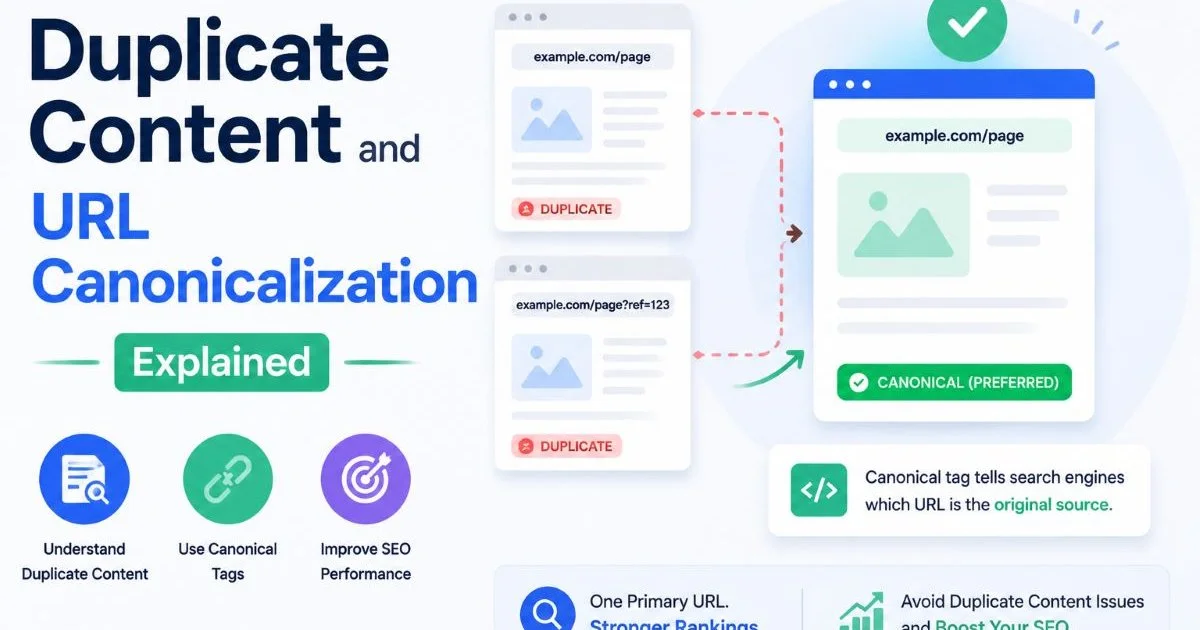
A canonical tag is an HTML element (rel="canonical") placed in the <head> of a page that tells search engines which URL is the authoritative version of that content. Think of it as a vote: when multiple URLs serve identical or near-identical content, the canonical tag points to the one you want indexed.
Google treats this as a strong hint, not a directive, meaning it can override your preference if other signals contradict it. The tag was jointly introduced by Google, Yahoo, and Microsoft in 2009 to address the growing problem of duplicate content across the web.
Common Causes of Duplicate URLs
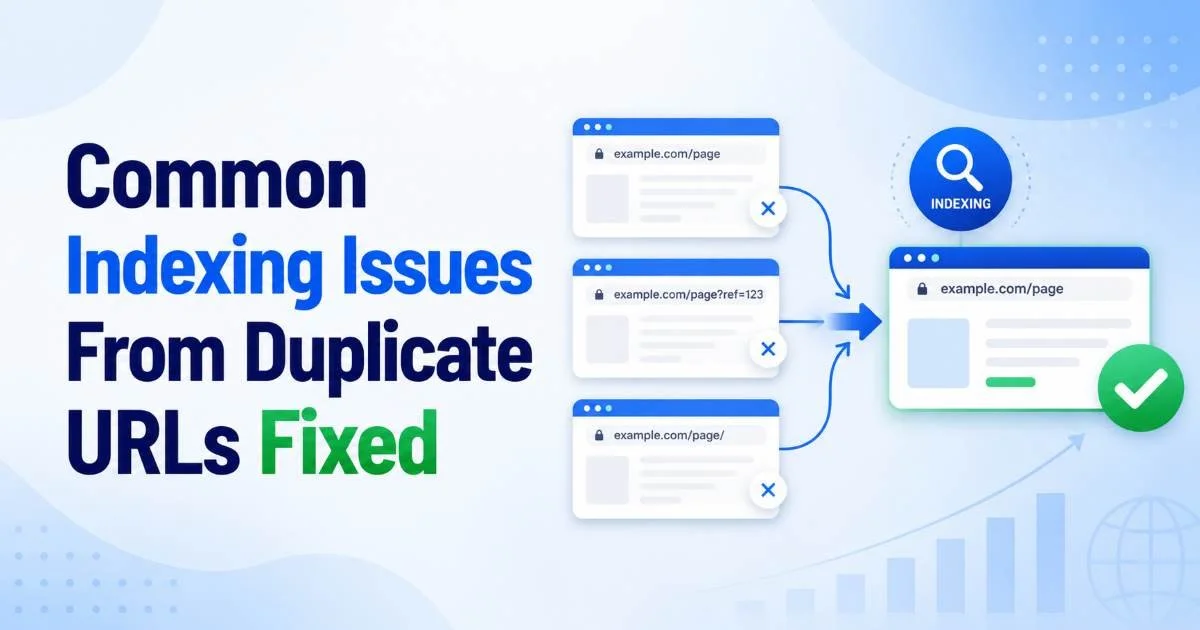
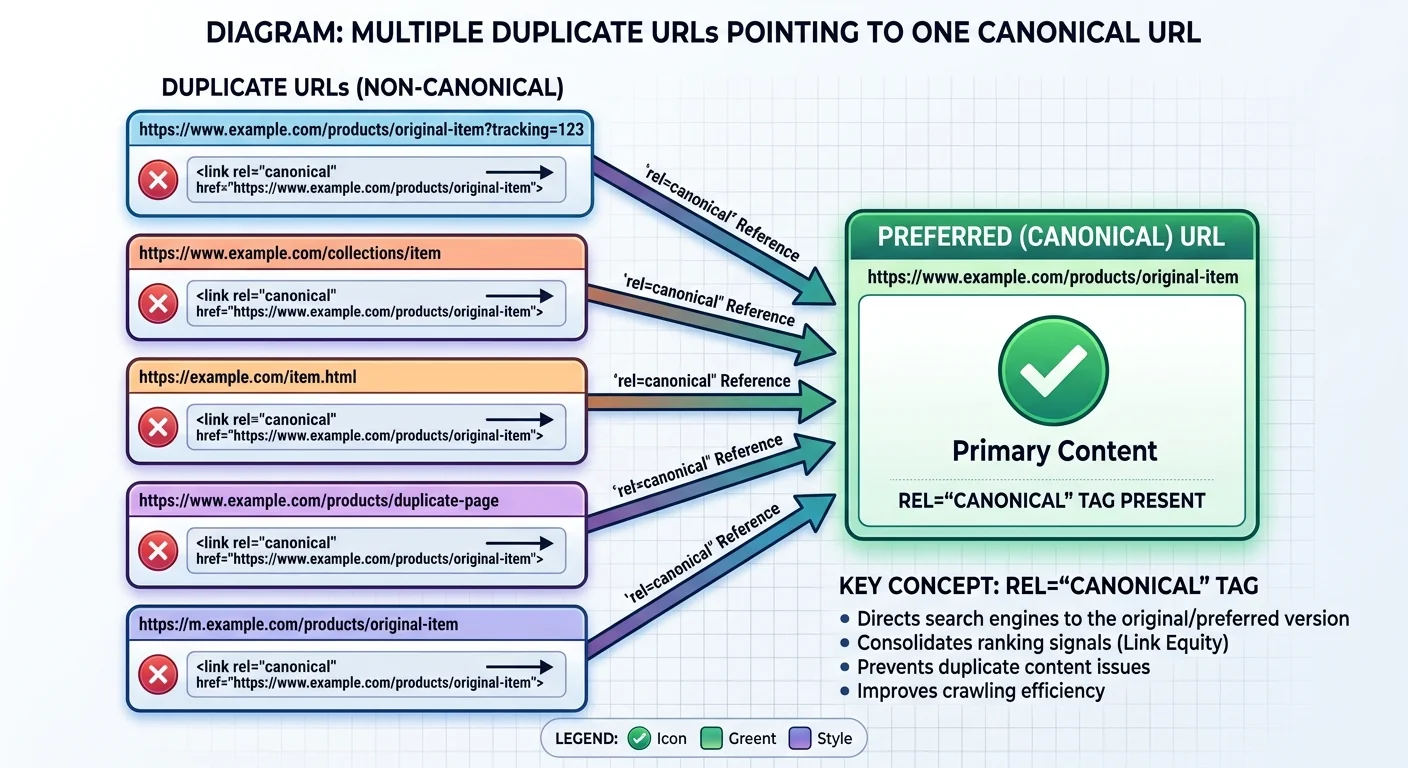
Duplicate URLs emerge for many reasons, and most of them are unintentional. URL parameters for tracking, sorting, or filtering are the most frequent culprits. A page like /shoes might also be accessible at /shoes?color=red, /shoes?sort=price, and /shoes?ref=email. Each of those URLs may render the same content or a very similar version. Session IDs, www versus non-www, HTTP versus HTTPS, and trailing slashes all produce additional duplicates without any deliberate action from the site owner.
Content management systems and e-commerce platforms often generate these duplicates automatically. For example, a product listed under two categories might live at both /men/sneakers/air-max and /sale/sneakers/air-max. Without proper url canonicalization, Google sees two competing pages with identical content. Syndicated content across subdomains or partner sites adds another layer of complexity. The result is a fragmented signal landscape where search engines must guess which page deserves the ranking authority.
How Canonicalization Works in Practice
When Googlebot crawls a page, it reads the canonical tag and compares it against other signals to determine the "canonical URL" it will store in its index. If the tag points to a different URL, Google may choose to index only the target URL and consolidate signals from the duplicate. This process is part of Google's broader indexing pipeline, where it groups similar pages into clusters and selects one representative. The canonical tag gives you influence over that selection, but it competes with factors like internal linking patterns, sitemap inclusions, and redirect chains.
There are several methods for specifying a canonical URL beyond the HTML tag. You can set a canonical via the HTTP response header (useful for PDFs and non-HTML files), use 301 redirects to force consolidation, or configure URL parameters in Google Search Console. Each method has trade-offs. A 301 redirect is the strongest signal because it physically sends users and bots to a single URL. The HTML tag is more flexible because it allows both URLs to remain accessible while still communicating your preference. Understanding what SEO involves at a fundamental level helps practitioners appreciate why these technical details matter so much.
The Role of Indexing Signals
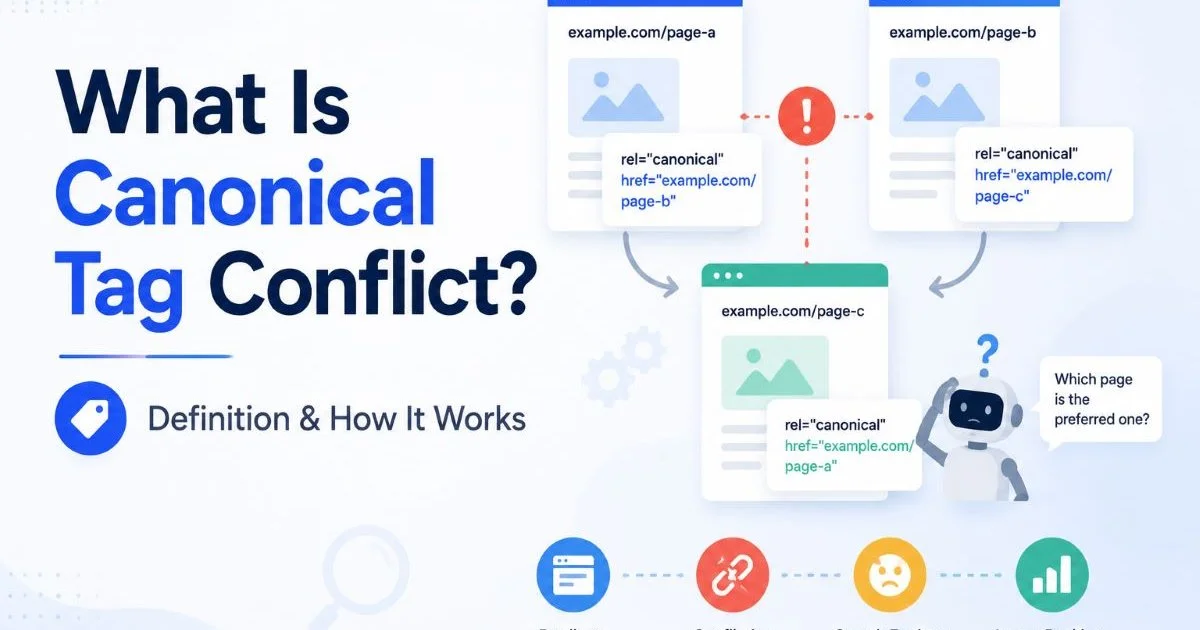
Indexing signals are the collection of technical cues that tell search engines how to handle a page. These include the canonical tag, meta robots directives, X-Robots-Tag headers, hreflang annotations, sitemap presence, and internal link structures. When these signals align, search engines process your pages efficiently. When they conflict, you get unpredictable results. A page with a canonical pointing to URL A but internal links all pointing to URL B sends mixed messages. Google will try to reconcile the contradiction, and it may not choose the version you prefer.
Always verify that your sitemap URLs match your canonical URLs. Discrepancies between the two are a common source of confusion for crawlers.
The strength of each signal varies. Google has stated that the canonical tag is a "strong hint" but that it uses additional signals to validate or override it. In practice, pages with stronger internal link equity, more external backlinks, or higher engagement metrics may win the canonical selection even if another URL carries the tag. This is why a holistic approach to canonicalization matters more than simply adding a tag and forgetting about it.
Common Misconceptions and Page Conflicts
One widespread myth is that a canonical tag works like a directive, similar to a noindex tag. It does not. Google treats it as a recommendation and reserves the right to choose a different canonical based on its own analysis. Another misconception is that canonical tags can point across completely different content. Pointing a blog post about hiking to a product page for boots will likely be ignored because Google evaluates content similarity before honoring the tag. The pages need to be substantially similar for the signal to carry weight.
"A canonical tag is a suggestion to Google, not a command. Treat it as one signal among many, not as a guaranteed fix."
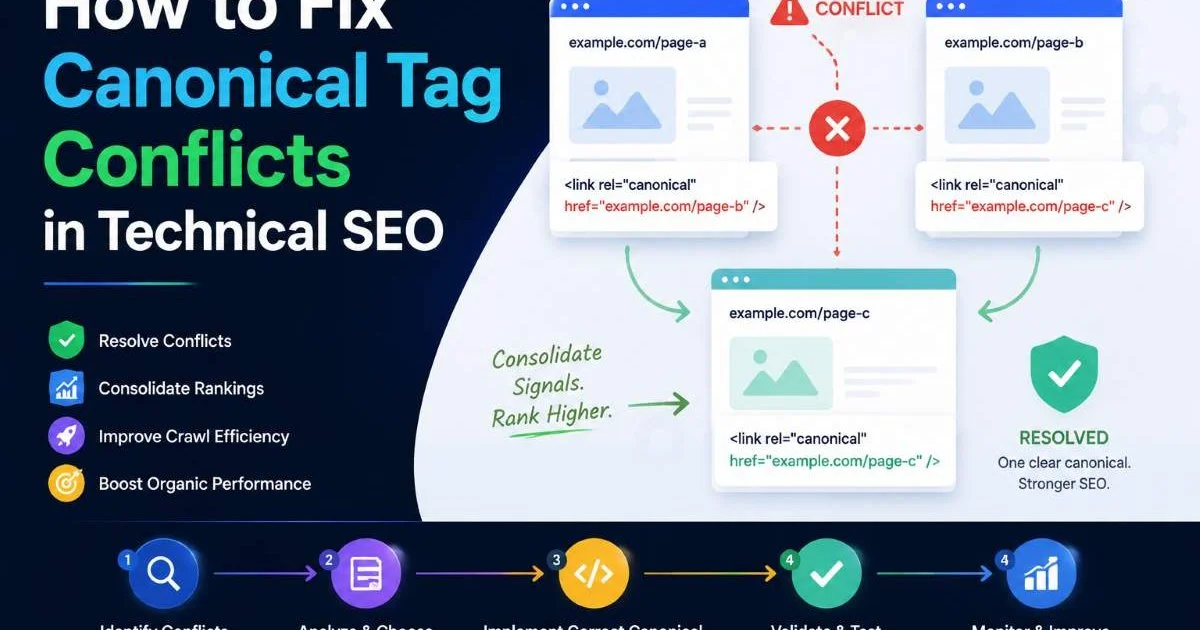
Page conflicts arise when multiple technical signals contradict each other. The classic example is a page with both a noindex meta tag and a canonical pointing to itself. Google has noted that this combination can lead to the page being dropped from the index entirely, since the noindex directive may take precedence. Similarly, pages where the canonical points to a URL that returns a 404 or 301 redirect create broken chains that confuse crawlers. These conflicts often go unnoticed for months because they do not produce visible errors on the front end of the website.
Canonical Tag Issues That Cause Real Damage
One particularly harmful issue is canonicalizing all pages to the homepage. This sometimes happens when a CMS plugin is misconfigured, and it effectively tells Google that every page on your site is a duplicate of the homepage. The result is a dramatic loss of indexed pages. Another common problem is canonical chains, where page A canonicals to page B, which canonicals to page C. Google will try to follow the chain, but each hop weakens the signal and increases the chance of the wrong resolution.
Never place a canonical tag in the body of your HTML. Search engines only recognize it within the head section, and a misplaced tag will be silently ignored.
Cross-domain canonicals, where you point from your site to an external domain, also require caution. While this is a legitimate technique for syndicated content, it hands indexing authority to another website. If implemented incorrectly on original content, you could accidentally deindex your own pages in favor of a third party. Ensuring your mobile SEO implementation handles canonical tags correctly is equally important, especially for sites with separate mobile URLs where cross-device canonicals must be properly configured.
| Error Type | What Happens | Severity | Fix |
|---|---|---|---|
| Canonical to 404 page | Google ignores the tag | High | Update to a valid, live URL |
| Canonical chain (A→B→C) | Weakened signal, possible wrong selection | Medium | Point directly to final URL |
| All pages canonical to homepage | Mass deindexation of inner pages | Critical | Fix CMS plugin or template logic |
| Noindex + self-canonical | Page may be dropped from index | High | Remove one conflicting directive |
| HTTP canonical on HTTPS page | Protocol mismatch confuses crawlers | Medium | Match canonical protocol to page |
| Canonical to different content | Tag is ignored by Google | Low | Only canonical near-identical pages |
Auditing and Fixing Your Canonical Setup
Regular audits are the only reliable way to catch canonical tag issues before they compound. Start by crawling your entire site and extracting the canonical tag from every page. Compare the declared canonical URL against the actual page URL. Any mismatches deserve investigation. Look for patterns: are certain URL parameters generating canonicals that point to the wrong base URL? Are paginated pages canonicalizing to page one when they should be self-referencing? Tools like our canonical URL checker can automate much of this discovery process.
A Practical Audit Workflow
Begin by exporting all URLs from your sitemap and cross-referencing them with the canonical URLs found during a crawl. Identify any URL in your sitemap that has a canonical pointing elsewhere, because this signals a conflict. Next, check for pages that lack a canonical tag entirely. While Google will still try to determine the canonical on its own, you are leaving the decision to an algorithm rather than making it yourself. Self-referencing canonicals on every indexable page are a simple safeguard that takes minutes to implement but prevents many duplicate content problems.
Google Search Console's "Page Indexing" report now flags pages where Google selected a different canonical than the one you declared. Check this report monthly.
You should also scan your website for broader technical SEO problems that may interact with your canonical setup. Broken internal links, redirect loops, and orphaned pages all affect how Google discovers and processes your canonical tags. A page that cannot be reached through internal links may have its canonical ignored simply because Google does not crawl it frequently enough to notice the tag. Combining canonical audits with a full technical review gives you the most complete picture of your site's indexing health.
After identifying problems, prioritize fixes based on the number of affected pages and their importance to your business. A canonical error on your top-selling product page demands immediate attention, while a parameter-based duplicate on a low-traffic blog post can wait. Document every change and monitor Google Search Console for shifts in indexed page counts over the following weeks. Canonical fixes often take two to six weeks to fully propagate through Google's index, so patience is part of the process.
Set up automated monitoring for canonical tag changes. CMS updates, theme changes, and plugin installations frequently overwrite canonical configurations without warning.
Frequently Asked Questions
?How do I fix canonical tags when a product lives under two category URLs?
?Does a rel=canonical tag guarantee Google indexes my preferred URL?
?How long does it take to recover rankings after fixing canonical tag conflicts?
?Can combining noindex and a canonical tag on the same page cause problems?
Final Thoughts
Managing canonical tags duplicate URLs is not a one-time task but an ongoing discipline. Every site update, new product launch, or CMS migration can introduce fresh duplicate content problems that undermine your organic performance.
The good news is that the fundamentals are straightforward: declare a clear canonical on every page, align your indexing signals, and audit regularly. Treat canonicalization as a core part of your technical SEO maintenance, not an afterthought, and you will give search engines the clarity they need to rank the right pages.
Disclaimer: Portions of this content may have been generated using AI tools to enhance clarity and brevity. While reviewed by a human, independent verification is encouraged.